5 Export Formats
CSV, Excel, JSON, NDJSON, and SQL. Optimized for analysis.
Export clean, analysis-ready data from websites in seconds.
Automatic cleaning, column control, and reusable export profiles. All inside your browser.
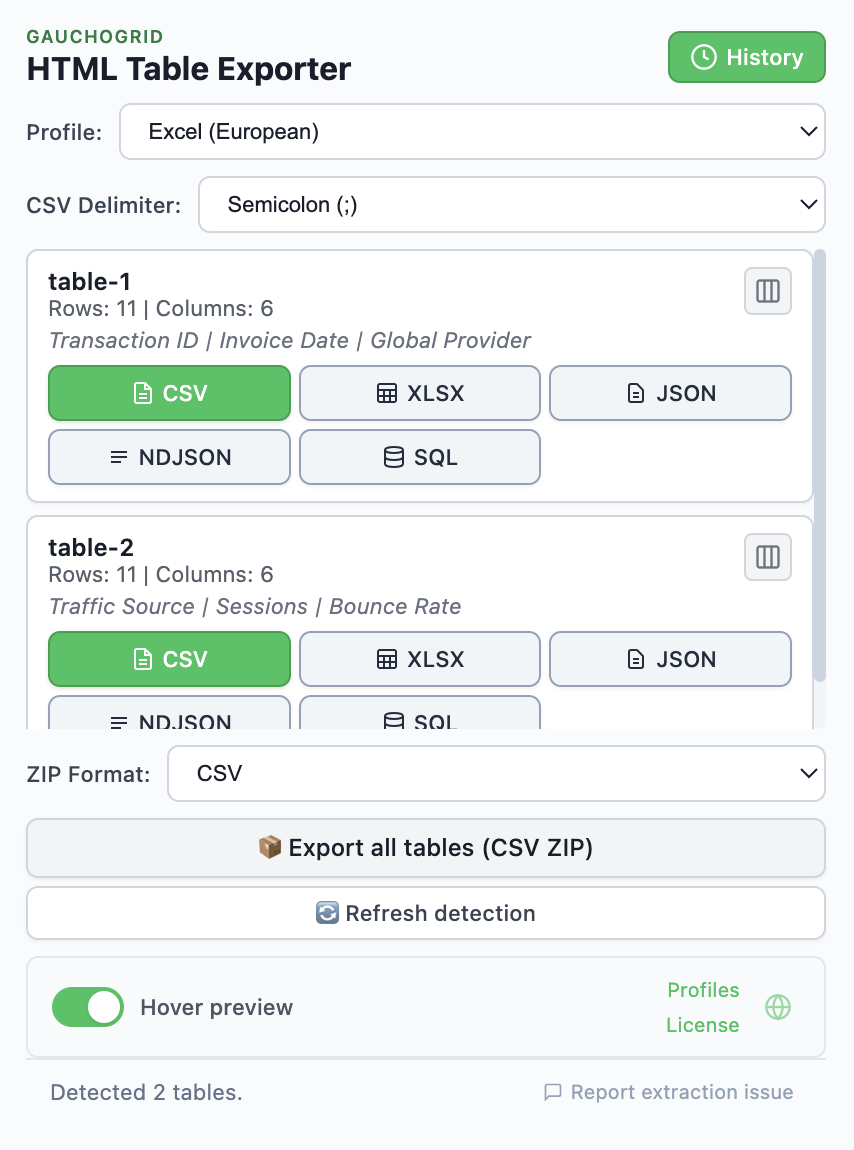
Detect tables automatically. Clean, preview, and export exactly what you need.
CSV, Excel, JSON, NDJSON, and SQL. Optimized for analysis.
Select and reorder columns. Export only what matters.
See cleaned data before exporting. No surprises.
Repeat any export with one click. Same settings, instantly.
Save your settings once. Apply to any table.
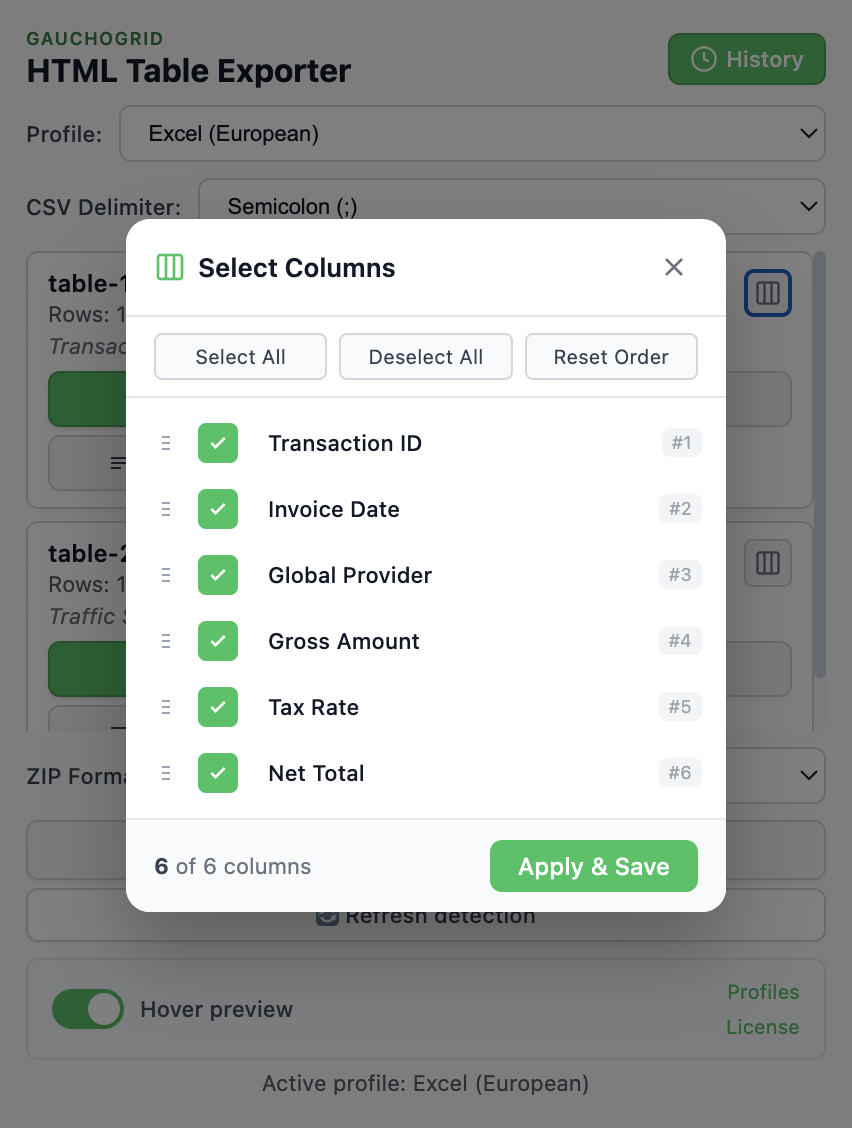
Export only what matters. Select which columns to include, uncheck the ones you don't need, and drag to reorder. Stop deleting columns in Excel after every export.
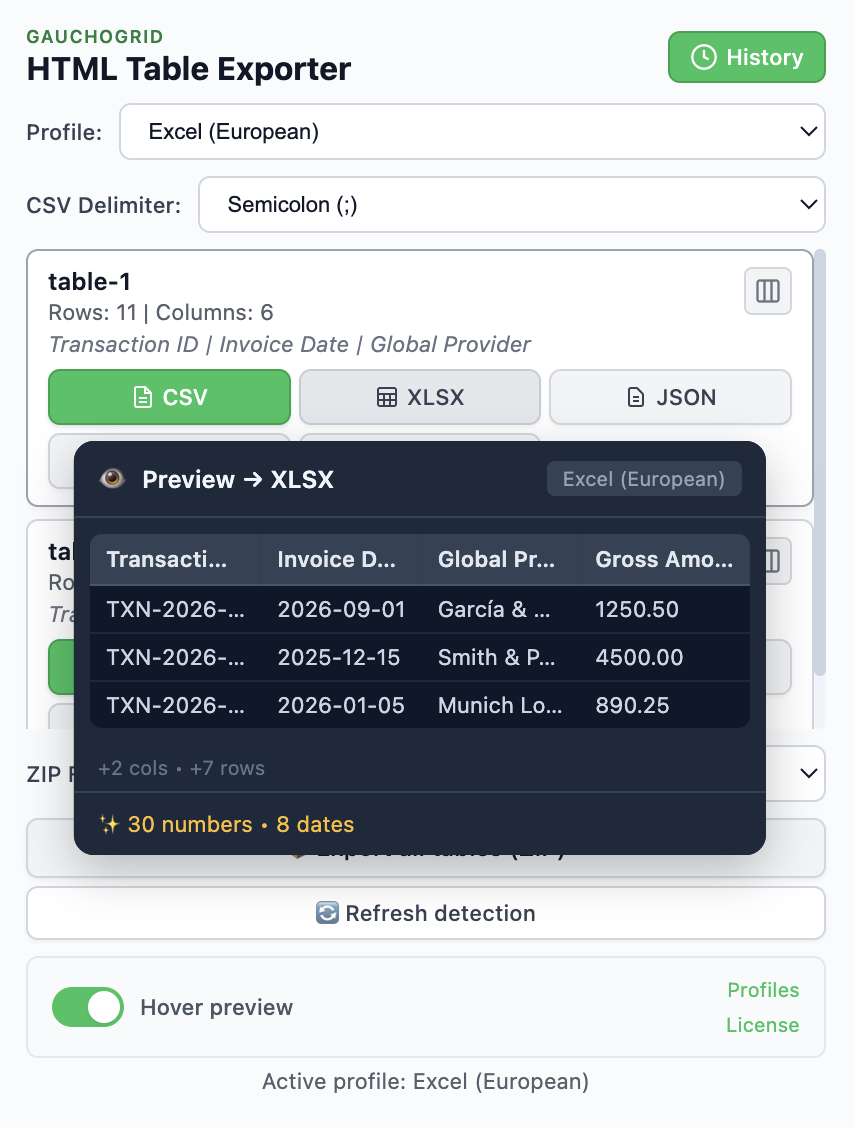
See exactly how your data will look before generating the file. Numbers, dates, and null values are normalized automatically based on your profile settings.
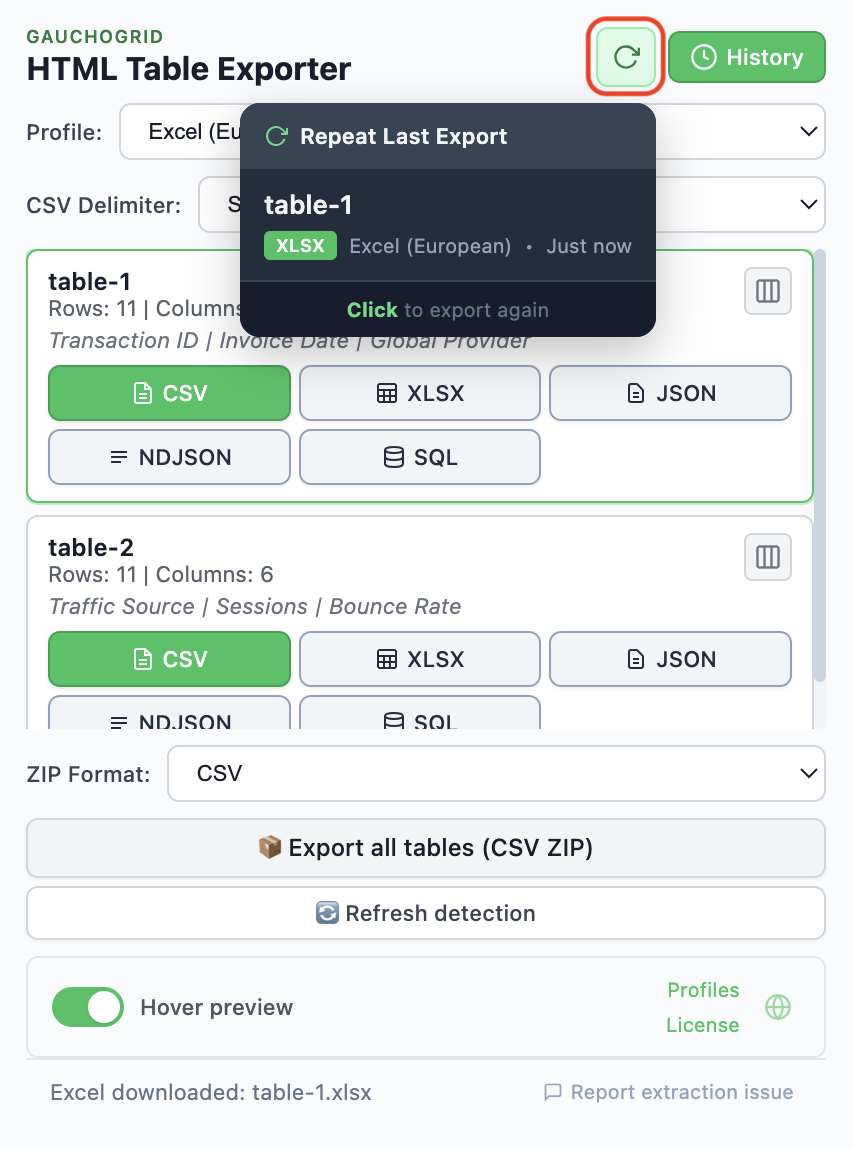
Export history remembers your last exports. Rerun any export with the same format, profile, and column selection. Perfect for recurring data sources.
Most table exporters only handle basic HTML tables. PRO understands modern web applications too: JavaScript data grids, virtualized lists, and dynamically-loaded content. Detection still depends on how each site builds its tables, so the free version is the best way to verify your specific case.
Handles paginated tables, virtualized grids, and dynamically-loaded data that simple exporters can't reach.
Reads tables that render rows on demand or replace DOM nodes as you scroll. Detection depends on each site's table implementation.
Capture and processing happens in your browser. No data is uploaded, no external requests are made.
Most browser extensions translate their store description and stop there. HTML Table Exporter is fully localized: every menu, every error message, every tooltip is translated and reviewed for natural reading.
Your browser language is detected automatically on first install. You can change it any time from the extension settings.
Export once. Reuse forever.
Save cleaning rules, column selection, and formats. Perfect for recurring data sources.
Export only what matters.
Select and reorder columns once. Stop deleting columns in Excel.
See the cleaned data before exporting.
Preview how numbers, dates, and nulls will look before generating the file.
Your exports document themselves.
ZIP exports include schema.json and README.md with source and export rules.
All processing happens locally. No servers. No uploads. No tracking.
Optimized for analysis, not just storage.
The free version works great. PRO adds power features for daily users.
| Feature | Free | PRO |
|---|---|---|
| CSV Export | ✓ | ✓ |
| JSON Export | ✓ | ✓ |
| Excel Export | ✓ | ✓ |
| NDJSON Export | — | ✓ |
| SQL Export | — | ✓ |
| Auto table detection | ✓ | ✓ |
| Merged cell handling | ✓ | ✓ |
| ZIP download (all tables) | CSV only | Multi-format |
| Preset profiles (Pandas, DuckDB, etc.) | — | ✓ |
| Cleaning presets (numbers, dates, nulls) | — | ✓ |
| Column selection & reordering | — | ✓ |
| Export history | — | ✓ |
| Repeat last export | — | ✓ |
| Hover preview | — | ✓ |
| Complex table extraction | — | ✓ |
| 100% local processing | ✓ | ✓ |
All PRO features included. Cancel anytime.
No. HTML Table Exporter runs 100% locally in your browser. Your data never leaves your device, and we don't collect any analytics. After purchase, you'll receive a license key. No registration required.
The free version includes CSV, JSON, and Excel export with basic cleaning. PRO adds professional formats (SQL, NDJSON), advanced cleaning presets, custom export profiles, batch ZIP export, and auto-generated metadata with schema.json and README.md files.
The extension does not require a server for data processing. All processing happens locally in your browser. Your license is validated periodically, but cached locally between checks.
A profile saves your preferred settings: cleaning rules, output formats, naming conventions, and metadata options. For example, create a "Pandas" profile that auto-normalizes dates and numbers, exports to CSV with UTF-8 encoding, and includes a schema.json. Reuse it across all your projects with one click.
PRO automatically detects and normalizes common data issues: dates convert to ISO format, currencies and numbers handle both US and LATAM formats, empty/null values standardize, and boolean fields convert to true/false. All rules are customizable per profile.
schema.json documents the structure of your exported data: column names, inferred types, and nullability. It's essential for professional workflows: you can import it into DuckDB, use it to validate data pipelines, or share it with teammates.
Yes. You can choose monthly ($19/mo, cancel anytime) or annual ($149/year, save 35%). For teams, we offer TEAM (5 seats, $599/year) and BUSINESS (10 seats, $1,049/year) plans. All plans include every PRO feature and all future updates while your subscription remains active. No hidden fees, no surprises.
14-day money-back guarantee, no questions asked. If you're not satisfied for any reason, submit a request via our official Support Form within 14 days of your purchase.
Your previously exported files remain yours forever. CSV, XLSX, JSON, NDJSON, and SQL are open standard formats. Every spreadsheet, database, and analysis tool can read them. There is no proprietary format and no vendor lock-in. After cancellation, the extension reverts to the free tier with CSV, JSON, and XLSX export still available; PRO features (cleaning presets, profiles, NDJSON, SQL, history) are locked at the end of your billing period.
HTML Table Exporter is built for Chrome and works perfectly on any Chromium-based browser (Chrome, Brave, Edge, Arc, Opera). Firefox and Safari are not currently supported.
HTML Table Exporter can detect and export tables from many popular web applications, including CRM platforms, analytics dashboards, and business tools. Results depend on how each site renders its data — the extension works best with standard HTML table elements. We recommend trying the free version on your specific platform before upgrading to PRO.
HTML Table Exporter does not impose any row limit. You can export as many rows as the source table contains. The actual number of exportable rows depends on how the website loads and renders its data — for paginated or virtualized tables, only the rows currently rendered in the browser are available for export.
Yes. All data processing happens locally in the browser — nothing is uploaded to external servers. The extension does not collect analytics or telemetry. No account is required.
The extension is built on Manifest V3, the latest Chrome extension standard. It declares 4 API permissions (activeTab, storage, downloads, scripting) plus host access to <all_urls>, which is standard for data extraction tools and is used only to read tables on pages where you actively invoke the extension. The manifest also enforces a Content Security Policy that restricts outbound network connections from the extension to two endpoints: the LemonSqueezy API for license key validation and Google Forms for the optional in-app feedback form you submit voluntarily. The content script that reads table data does not initiate any network requests. The extension does not collect telemetry, analytics, or usage data, and does not request permissions like tabs or webNavigation. Full permission details are in our Privacy Policy.
Web scrapers are designed for automated, large-scale data extraction — often requiring configuration, selectors, or coding. HTML Table Exporter is a manual, interactive tool: you visit a page, click the extension, and export the tables you see. It focuses specifically on HTML tables and adds features scrapers typically lack, like automatic data cleaning, column reordering, and reusable export profiles. It is not designed for scheduled scraping or automated pipelines.
Yes. Because the extension runs inside your browser, it can detect tables on any page you are logged into — including dashboards, intranets, and authenticated web applications. It reads the tables that are already rendered in your browser; it does not bypass authentication or access data you cannot see.
Export clean, analysis-ready data in seconds, not hours.